CSCI 201 Spring 2003
Programming Project 3
In assignment 2 you wrote an
Applet---a java program that runs in a browser window. In this
assignment, you will modify that program as described in problem 4.9
on page 266 of your text. This is a somewhat complicated modification
so we will be specific about the modifications. Here are the steps
that you should follow in writing this program:
- Begin with the Quilt program that you wrote for assignment 2. If
you were unable to correctly complete that program, feel free to begin
with the example solution provided in this
link. You will also need the accompanying HTML document. (Download these files by
right-clicking on each link and selecting Save Target As
from the pop-up menu.)
- We are going to begin by creating a new class that draws one patch
of the Quilt. To create that class do the following:
- Copy Quilt.java to Pattern.java. Rename the class in
Pattern.java to Pattern and rename the method paint() to draw() (don't
change the parameter).
- Declare the following 5 instance variables in the Pattern class:
- An integer x that should be initialized to the x position of the
upper left corner of the patch.
- An integer y that should be initialized to the y position of the
upper left corner of the patch.
- An integer diameter, that should be initialized to the diameter of
the largest circle in the patch.
- An integer numberCircles, used to specify the number of concentric
circles to be created in the patch.
- A Color color, used to specify the only color (other than white) to be
used in forming the patch.
- Write a constructor method that can be used to
initialize the instance variables added above. The constructor should
allow the user to supply the appropriate initial values for all of the
instance variables via parameters.
- Rewrite the draw() method as follows:
- Remove code that is not involved in drawing a single patch.
- Calculate the circle width so that each of the numberCircles
concentric circles has equal width.
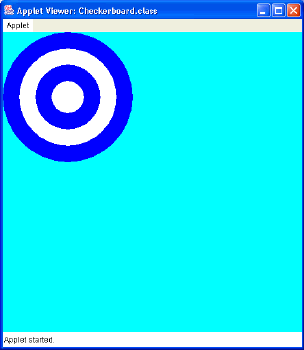
- Modify the code to produce concentric circles that alternate
between two colors: the value of the Color instance variable and white
as shown below. (In the picture below, the Color instance variable has
the value Color.blue.)
- Rename Quilt.java to Checkerboard.java, both the class name and the
file name. Also rename Quilt.html Checkerboard.html and change all
internal references from Quilt to Checkerboard.
- Modify the code in Checkerboard.java to produce a quilt
with a checkerboard pattern of patches similar to that shown below.
The patches in the quilt must be created using the Pattern class
created as described above. The checkerboard pattern should be
created by varying both the number of circles and the color of the
alternating patches as shown below; you may use any number of
concentric circles and any colors you choose. You may also produce a
quilt of any size you choose; you are not restricted to a 3x3 quilt as
shown below.

Programming Style
Note that 10% of your program grade is based on the readability of
your program. This includes things like proper indentation, comments,
and the naming of variables and methods. To receive full credit for
your program, make sure that you use proper indentation as
demonstrated in your text and in class room examples. Also include a
comment at the top of each program stating your name, the course, and
the purpose of the program:
// Name: your name here
//
// Course: CSCI 201
//
// Purpose: purpose of program here
//
Submitting Your Program
The program written for this assignment must be turned in by
transferring the java source code files and the HTML file to your ftp
directory for this class. Both source code files (i.e.,
Pattern.java and Checkerboard.java) and the HTML file
(Checkerboard.html) should be turned in and the files must
have exactly those names. You were shown how to transfer files to
your class ftp directory in lab
1