This lab illustrates the similarities of Java and C.
Getting started using Java
Start NetBeans. Now create a project, using the menu choices File ⇒ New Project. At the New Project window select the project type Java Application and then press Finish.
Next delete the main method and replace it with the
following.
    import java.util.Scanner ;

    public static void main(String[] args) {
        Scanner termInput = new Scanner(System.in);
        System.out.println("This is Java") ;
        System.out.println("Type in a small integer");
        int yourChoice = termInput.nextInt() ;
        for (int n = yourChoice; n>0; --n) {
            System.out.printf("%4d\n", n) ;
        }
        System.out.println("Blastoff!") ;
    }
Run the program and look at the output. Pretty boring.
Making C
Now we are going to write some C and C++. It won’t be as hard as you think. Start by creating a new NetBeans project. At the New Project menu create a C/C++ application within the C/C++ category.
You will need to use the little arrow on the side to specify that
you are creating a C, rather than C++ or FORTRAN, application.
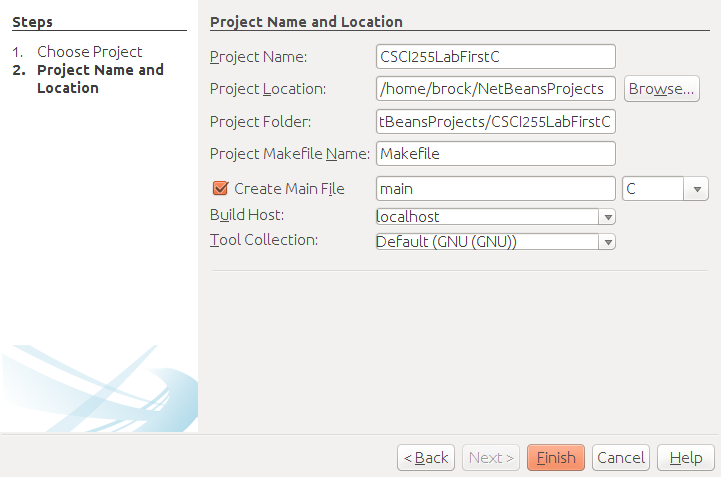
Copy the contents of Java’s main method into
C’s main function.
Do not copy the method header!
Expect NetBeans to light up your C program.
At this point, we are going to go in lecture/lab mode. There are a few things to be done here.
- Use
putsrather thanSystem.out.println. - Use
printfrather thanSystem.out.printf. - Use
scanfrather than thenextIntmethod. This one is a little trickier because it requires the use of C’s&(address-of) operator. - Move the declaration of the variables! This is required only in older versions of C.
Making C++
Technically every C program is a C++ program, but let’s try to make a real C++ program. Again create a C/C++ application within the C/C++ category, but this time go with the default choice of C++ for the main file.
You can go ahead and replace the your C++ main with your C main. It won’t quite work, so try the following:
- Look at the C++ Files and Streams tutorial on tutorialspoint.
- Replace the calls of
putsandprintfwith invocations of the overloaded<<operator of C++’sostreamclass. C++ allows operator overloading. Java does not. - OK. You will also need to add
include’s forfstreamandiostream. - Replace the call of
scanfwith an invocation of the overloaded>>operator of C++’sistreamclass.
That should be enough to get your program to run.
The only problem is that n is not being print in the field of four
characters. This requires adding an include for the
iomanip class, a use of the setw
method, and the magic of multiple inheritence.
cout << setw(4) << n << endl ;