This assignment must be submitted as a single file named yourlastname.asm for Assignment 5 of the CSCI 255 section on UNCA moodle by 11:00 PM on Friday, 4 December.
Be sure to read the first half of the Guide to Using the Windows version of the LC-3 Simulator and LC3Edit by Kathy Buchheit before attempting to run the LC-3 Simulator. This will save you a lot of time.
Write an LC-3 program similar to the following semi-legal C program.
int Table[10] ;

main() {
  int nextC ;
  int i ;
  for (i=0; i<10; ++i)
    Table[i] = 0 ;
  while ((nextC = getchar()) > 16) {
    if ('0' <= nextC && nextC <= '9')
      ++Table[nextC-'0'] ;
  }
  PrintTable(Table) ;
}
Of, if you prefer, similar to the
main of this complete Java program.
public class Main {

  static void PrintTable(int[] t) {
    for (int i=0; i<10; ++i)
      System.out.println("Slot " + (i+'0')
            + " has " + (t[i]+'0') + " elements") ;
  }

  static int Table[] = new int[10] ;

  public static void main(String[] args) {
    int nextC ;
    int i ;
    for (i=0; i<10; ++i)
      Table[i] = 0 ;
    try {
      while ((nextC = System.in.read()) > 16) {
        if ('0' <= nextC && nextC <= '9')
          ++Table[nextC-'0'] ;
      }
    } catch(java.io.IOException ignore) { }
    PrintTable(Table) ;
 }
 }
The PrintTable routine will be given to you a
LC-3 assembly code. It must not be changed by your
program. It is located at address x3800 and is
called by putting the address of the table into register R0.
The PrintTable routine saves no registers. This should
not be a problem since your program returns right after
PrintTable returns.
Your program should echo the characters that it reads.
This is done automatically by the operating system on most computers,
but for the LC-3, you need to call OUT immediately following
your call to GETC.
Your program must be located at address x3000.
When you test your program, load the assembled object file for
PrintTable.
You will need to use the JSRR instruction
to call PrintTable.
Your seqeuence to do this and end the
program will look something like the following:
         LEA    R0,Table
         LD     R4,FUNCADD
         JSRR   R4
         HALT
FUNCADD  .FILL  x3800
Table    .BLKW  #10
Your program must be able to run more than once without
being reloaded. This is why the ten-element array corresponding
to Table must be zeroed at the beginning of each run.
I suggest write your program in the following stages.
'0' and
'9'. The easiest way to do this is to subtract
48, the ASCII code for the digit '0', from the input character.Table for each input digit.PrintTable at location x3800.The print table routine can be download or cut-and-pasted from below.
;; Table printing routine for Assignment 5
;; R0 should contain address of histogram table with ten elements
        .ORIG        x3800
        ST        R7,SaveR7
        ADD       R1,R0,#0         ;; R1 <- R0
        LD        R2,X             ;; R2 <- 10
        LD        R3,ASC0          ;; R3 <- '0'
        ADD       R4,R3,#0         ;; R4 <- '0'
;; Do this loop 10 times
Loop    LEA       R0,MSG1          ;; R0 <- MSG1
        STR       R4,R0,#5         ;; MSG1[5] <- R4  next character to print
        LDR       R5,R1,#0         ;; R5 <- *R1      value of next element
        ADD       R5,R5,R3         ;; R5 <- R5+R3    add in offset '0'
        STR       R5,R0,#11        ;; MSG1[5] <- R5
        PUTS                       ;; Print the message
        ADD       R4,R4,#1         ;; ++R4           '0','1','2',....
        ADD       R1,R1,#1         ;; ++R1           elements of histogram
        ADD       R2,R2,#-1        ;; --R2
        BRp       Loop             ;;                do the loop ten times
        LD        R7,SaveR7
        RET
SaveR7  .BLKW     1
X       .FILL     #10
ASC0    .FILL     #48
MSG1    .STRINGZ "Slot X has Y elements\n"
        .END
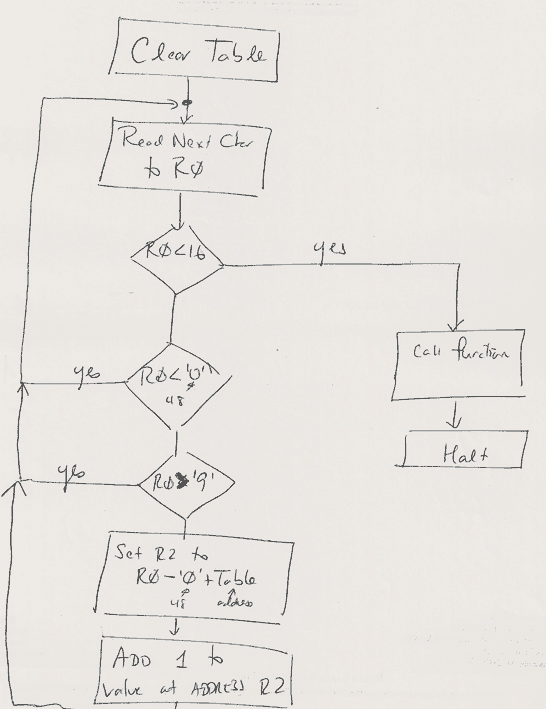
My solution has 31 lines of LC-3 code when comments are omitted.
Here, for a limited time only, is a rather crude flowchar