
home | homework index | labs index
|
|
CSCI 201
Introduction to Algorithm Design home | homework index | labs index |
FALL 2006 |
The goal for this week's lab is to learn about Java classes.
We're going to start by writing a program that can produce the pouncing cats shown below. These cats were downloaded from the Cats & Dogs ASCII art page of "Flump". At the request of the artist, please don't delete the initials "hjw".
| Pouncing left | Pouncing right |
|---|---|
                       ,')
                      ( (
                       ) )
                      / /
                     / /
                  ,-'  `-.
                ,'        \
     _    , _,-'    (      )
     )`--/,)         `.   (
    /      \ (         )  /
   6),6>    ) \     )_/  /
 __(Y:.  _,'   )   /(((_/
(((_^---'`._,-'   /  ```   hjw
'''       ((( _.-'
          '''
|
   (`.
    ) )
   ( (
    \ \
     \ \
   .-'  `-.
  /        `.
 (      )    `-._ ,    _
  )   ,'         (.\--'(
  \  (         ) /      \
   \  \_(     / (    <6 (6
    \_)))\   (   `._  .:Y)__
     '''  \   `-._.'`---^_)))
           `-._ )))       ```
                ```           hjw
|
We need a Main driver class to test your cats.
Start by creating a NetBeans project named CatDraw
within your csci/201 directory.
As usual, when you see the New Project
window select General under
Categories
and Java Application under
Projects.
This should create a project with a Main class within
the catdraw project.
Now you're going to do something different. You're going
to add a second class to your project.
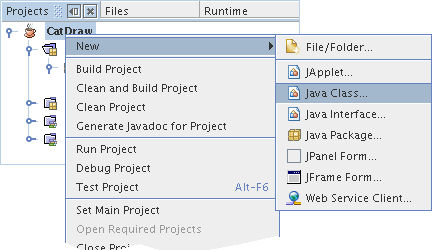
Within the Projects panel,
right click on the project name, CatDraw,
and then follow the menu selections
New →
Java class... to bring
up a New Java Class
window.
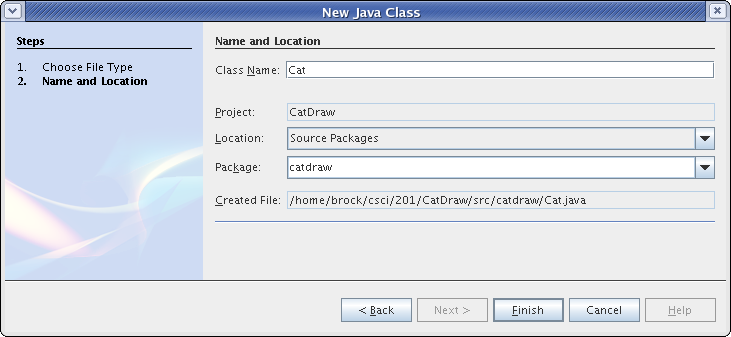
Cat as the
Class Name
and catdraw as
the Package
as show below.
When you are done creating classes, your
Projects panel should resemble
the one shown below.
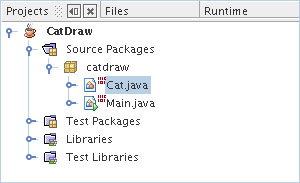
If it doesn't, call your instructor over.
In this lab you will be working with two different classes The upper-right panel of your NetBeans window should now have two tabs, one for the Java file Main.java and one for Cat.java. You will need to use these tabs to switch between the two classes as you work on this lab.
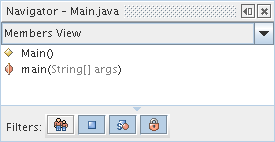
As you edit a class, the Navigator panel, generally located in the middle of the left side of NetBeans window, will display the methods and instance variables of your class. Consult the Navigator panel frequently throughout this lab to make sure you are modifying the right class. Switch between the two classes right now and make sure your Navigator panel matches those shown below.
| Main | Cat |
|---|---|
 |
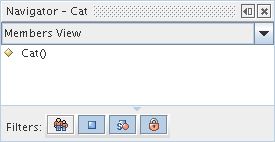 |
The Navigator window for
Main shows that it has a single method called main
and a single constructor
Cat's Navigator window
show only the one constructor.
Study the two methods shown below. They look just just like
the cat diagrams found at the beginning of the lab except
that each line of the drawings have been placed within a call
to the System.out.println method.
    public static void printLeftPounce() {
        System.out.println("                       ,'    ") ;
        System.out.println("                      ( (    ") ;
        System.out.println("                       ) )   ") ;
        System.out.println("                      / /    ") ;
        System.out.println("                     / /     ") ;
        System.out.println("                  ,-'  `-.   ") ;
        System.out.println("                ,'        \  ") ;
        System.out.println("     _    , _,-'    (      ) ") ;
        System.out.println("     )`--/,)         `.   (  ") ;
        System.out.println("    /      \ (         )  /  ") ;
        System.out.println("   6),6>    ) \     )_/  /   ") ;
        System.out.println(" __(Y:.  _,'   )   /(((_/    ") ;
        System.out.println("((_^---'`._,-'   /  ```   hjw") ;
        System.out.println("'''       ((( _.-'           ") ;
        System.out.println("          '''                ") ;
    }

    public static void printRightPounce() {
        System.out.println("   (`.                           ") ;
        System.out.println("    ) )                          ") ;
        System.out.println("   ( (                           ") ;
        System.out.println("    \ \                          ") ;
        System.out.println("     \ \                         ") ;
        System.out.println("   .-'  `-.                      ") ;
        System.out.println("  /        `.                    ") ;
        System.out.println(" (      )    `-._ ,    _         ") ;
        System.out.println("  )   ,'         (.\--'(         ") ;
        System.out.println("  \  (         ) /      \        ") ;
        System.out.println("   \  \_(     / (    <6 (6       ") ;
        System.out.println("    \_)))\   (   `._  .:Y)__     ") ;
        System.out.println("     '''  \   `-._.'`---^_)))    ") ;
        System.out.println("           `-._ )))       ```    ") ;
        System.out.println("                ```           hjw") ;
    }
Go to your Cat.java program and
cut-and-paste the printLeftPounce
and printRightPounce methods into your Cat class.
That's the Cat class, not the Main class!
These should be added immediately after the Cat
constructor.
    public Cat() {
    }
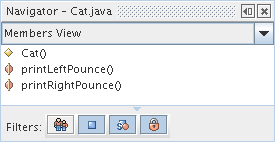
Your Navigator window
for Cat should now show its two methods.
Well, that didn't quite work. You've got red lines
under some of those System.out.println calls.
The problem is the backslashes ('\').
Remember how the escape sequence
'\n' was
used to put a linefeed (new line) in a string?
String escape sequences are ways to place special characters,
such a tabs ('\t'),
quote marks ('\"'),
and linefeeds ('\n') into strings.
All escape sequences begin with a backslash.
If want to include a real backslash in a string, you must
use the escape sequence '\\'. Yep, that's two backslashes.
Go into your printLeftPounce and printRightPounce
methods and double all the backslashes.
This should makes the red lines go away.
If you are having trouble doing this, get the
attention of someone who isn't.
If you'd like to learn a song about escape sequences, look at The Telnet Song by Java developer Guy Steele.
At this point you should be able to build and run your project. However, nothing happens.
You need to go into the file Main.java
and edit the main method of the Main class
of the catdraw package.
See the big hint below.
    public static void main(String[] args) {
        Cat.printLeftPounce() ;
        Cat.printRightPounce() ;
    }
Do not add the above method to the Cat class.
It goes in the Main class.
Now compile and run your program.
Show the instructor your pouncing cats.
In spite of what you've seen so far, static methods really
aren't that useful. We want to create some Cat
objects and call some of their methods.
Start by creating two Cat variables
within the main method.
Name one lefty
and name the other called righty.
Next add a call to the printLeftPounce
(or printRightPounce) method
of both cats.
Here's how this is done for lefty. We think you
can figure it out for righty.
        Cat lefty = new Cat() ;
        lefty.printLeftPounce() ;
Show the instructor your pouncing cat objects.
Go back to your Cat class.
Remove the modifier static from the
declarations of both the printLeftPounce
and printRightPounce methods.
Try to build and run your project. You should get a really
weird Java error message about IncompatibleClassChangeError.
Return to your Main class. Notice that the
Cat.printLeftPounce()
and Cat.printRightPounce() are now red-lined.
Because these calls begin with the
name of a class, rather than an object,
they are static method calls.
When we removed static as a modifier of
printLeftPounce and printRightPounce,
these calls became illegal.
Static methods are actually relatively rare in Java code.
That's one of the reasons why you must explicitly use the
modifier static when you want to create one.
Go ahead and fix this problem be deleting the
two offensive method calls from the Main class.
Objects would be rather boring and useless if they were all
the same. We want to enhance our Cat class so
that Cat objects have a little bit of internal
memory that remembers if the cat pounces to the left or right.
This is done with instance variables.
A instance variable is declared inside a class but
outside a method. This means that the variable can be accessed by
all the methods of a class.
Go to the Cat class and modify it so that
the beginning of Cat class looks like this:
public class Cat {
    boolean pouncesLeft = true;
You've now defined an instance variable for the Cat class.
Be sure you can still build your project before going further.
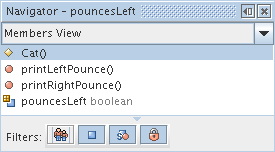
Also, make sure your Navigator panel
shows the new inference variable.
If not, you better talk with the instructor.
Our new instance variable can be used to specialize each Cat
object. Each Cat now has an internal boolean
attribute called pouncesLeft. If a method "looks"
at the value of pouncesLeft, it can modify its behavior.
Let's add the following additional method
(by cut-and-paste)
to the Cat class
to take advantage of the pouncesLeft variable.
    public void printPounce() {
       if (pouncesLeft) {
           printLeftPounce() ;
       } else {
           printRightPounce() ;
       }
    }
This new method uses the instance variable
pouncesLeft to determine in which direction
the cat will pounce.
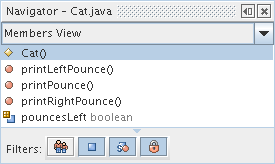
Your Navigator window
will should show your new method.
External "users" of the Cat object really ought to
call printPounce, rather than
printLeftPounce or printRightPounce.
Go to the Cat class and remove the
public modifier from the
printLeftPounce and printRightPounce methods.
If you build and run your project, every thing still seems to work fine.
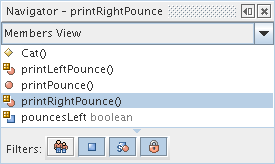
Take a look at the Navigator.
Note that the icons in front of the printLeftPounce
and printRightPounce have been changed to indicate
that these methods are no longer public.
This time add the modifier private to
printLeftPounce and printRightPounce methods.
You can still build the project, but that's due to some laziness on
the part of NetBeans. If you clean the project and then build
it, you'll see problems. But better yet, just look at the
Main class. There you will see that the calls to
printLeftPounce and printRightPounce have
been red-lined. That's because a class' private methods
can be invoked only within the class.
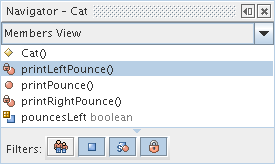
You should also note that the Navigator
has changed the icons for printLeftPounce
and printRightPounce.
The new icons have little locks to indicate that outsiders
can't mess with these methods.
It would be reasonable to assume that this exercise has shown that
a method with neither the public nor private
modifiers is effectively public. However, that ain't
the case. It's actually in a third state called package-private,
which means it is public to classes created in its own package and
private to classes created in other packages. In our case, both
Cat and Main are within the catdraw
package. That's why Cat's printPounce is public to
Main's Main.
Of course, all this is very confusing. Consequently, it's best
to explicitly use either private and public
as a method modifier rather than fall into the state of package-private.
In order to proceed with this lab, we must fix the problem in
the main method. Do this by changing all the
Cat method calls
in the Main class
to be to the public printPounce,
rather than the private
printLeftPounce or printRightPounce.
Wait here until you can clean, build, and run your project.
If you run your project, you'll see the cat is always pouncing to the
the left. That's because there's no code to change the
pouncesLeft instance variable of a Cat object.
A poor way to solve this problem (which might result in deducted points
in a homework assignment) would be to abuse the package-private nature
of the pouncesLeft variable and add the following statement
to the Main class.
righty.pouncesLeft = false ;
Just this once, go ahead and do it. If you put this statement right
before the call righty.printPounce(), you'll see
a changed cat.
Generally, it's not safe to let class "users" modify instance variables.
Let's eliminate this possibility by adding the private
modifier to our declaration of pouncesLeft as shown below.
private boolean pouncesLeft = true;
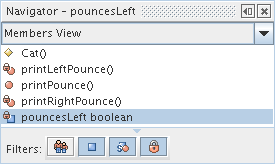
Now the Navigator windows
has associated a locking icon with pouncesLeft.
You should also see that the offensive assignment to the instance
variable in Main is now red-lined.
Remove the assignment so we can go on.
Instance variables should be modified through method calls.
Go to the Cat class and add the following method
declaration.
    public void setPouncesLeft(boolean b) {
        pouncesLeft = b ;
    }
Now if you call righty.setPounceLeft(false),
the Cat method will change its internal
instance variable pouncesLeft to false.
Spent one minute thinking about that. It's important.
If you follow the JavaBeans naming convention (and you should even if
you, like some CSCI 201 instructors, have no idea why this is
important), you should have both set and get methods
for your class' significant properties. This means your should also
add the following method to your Cat class.
    public boolean getPouncesLeft() {
        return pouncesLeft ;
    }
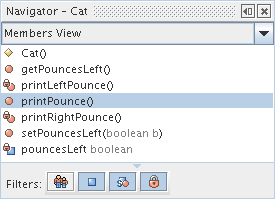
Modify the main method of Main so that
righty doesn't pounce left and show
your instructor the catty output.
Even though cats never come when called, humans give cats names anyway.
Add an instance variable to the Cat object for storing
a cat's name. Then add two methods getName and
setName to access the cat's name.
Modify the main method to
(1) use the setName method to set lefty's
name to "Lefty" and
righty's
name to "Righty" (or whatever) and
(2) use the getName method to obtain the cat's name
for printing with System.out.println.
Be sure to include the appropriate private and
public modifiers in your code.
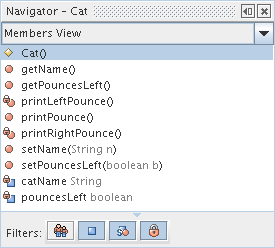
Your Navigator window
will grow at least three new entries during this step.
Show the instructor your classes.
Wouldn't it be nice if you could create Catobjects
in a single statement with the right name and pounce direction?
Well, that's what constructors do.
Start by adding the following single constructor in
your Cat class.
    public Cat(String n) {
        setName(n) ;
    }
Now you can go to the Main class and change your program
to create and initialize lefty in a single statement.
Cat lefty = new Cat("Lefty") ;
Add a second constructor to Cat so that you can
also initialize righty with a single statement.
Cat righty = new Cat("Righty", false) ;
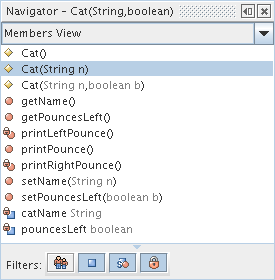
When you are done, you'll have a large
Navigator window for Cat.
Show the instructor your three-constructor Cat.
Last modified: 10/23/06